Seven logins and a spreadsheet
For a long time my homelab was a collection of good tools that had never been introduced.
Each one worked. The dashboard managed storage and services on a node. The IPAM knew which addresses were free. The DNS manager served names. The deployer cloned VMs. Every one of them did its job well, and I had written most of them precisely because the commercial alternative had annoyed me into it.
What I had not noticed was how much of my time went into being the integration layer myself.
Deploying a VM meant opening the IPAM to find a free address, writing it down, opening the DNS manager to create the record, waiting for the mirror, opening the deployer, typing the address in by hand, and then — once it booted — opening the controller to add the new node so something would watch it. Four interfaces, four logins, and one transcription error away from a duplicate address that would not surface until something else broke a week later.
The spreadsheet was the tell. I kept one, briefly, to track which addresses I had handed out. A spreadsheet is what you build when you have data in several systems and no system that owns it.
A collection of tools becomes an ecosystem the moment one of them can answer a question on another one’s behalf — without a human retyping the answer. Everything in this article is about the four places I finally let that happen, and what each one cost.
The pieces, briefly
I have written about most of these individually, so this is the map rather than the tour. Each link goes to the article that covers that piece properly.
Nexus Dashboard is the workhorse — the one doing the actual heavy lifting on 12 machines. It manages ZFS pools, services, storage, networking and containers by reading and writing the real Linux configuration, never a shadow database. Its founding rule is that the system is the truth and the dashboard is a lens.
Nexus Controller runs the fleet from one screen. It polls 23 devices — every dashboard node, plus SparkDash instances, DNS servers, hypervisors, NAS boxes and switches — and holds no privilege of its own to do it.
Nexus IPAM owns addressing. 103 addresses and 71 host records across nine networks, with pools, VLANs, discovery and reconciliation. Covered in DNS, DHCP and IPAM without the enterprise price tag.
DNSMAQ-MGR is the DNS and DHCP service itself, running on ns1 and ns2. It works standalone and does not know or care that an IPAM exists — which turns out to matter enormously, and I will come back to it.
SparkDash is the odd one out: a control dashboard for DGX Spark clusters, running sparkrun across the machines. Different hardware, different audience, same shape.
Three VM deployers — vCenter, ESXi and Proxmox — clone a template, inject cloud-init and report the address. The Proxmox port is its own story about how little had to change.
NexusSSO is the newest, and the only one whose entire job is to connect the others.
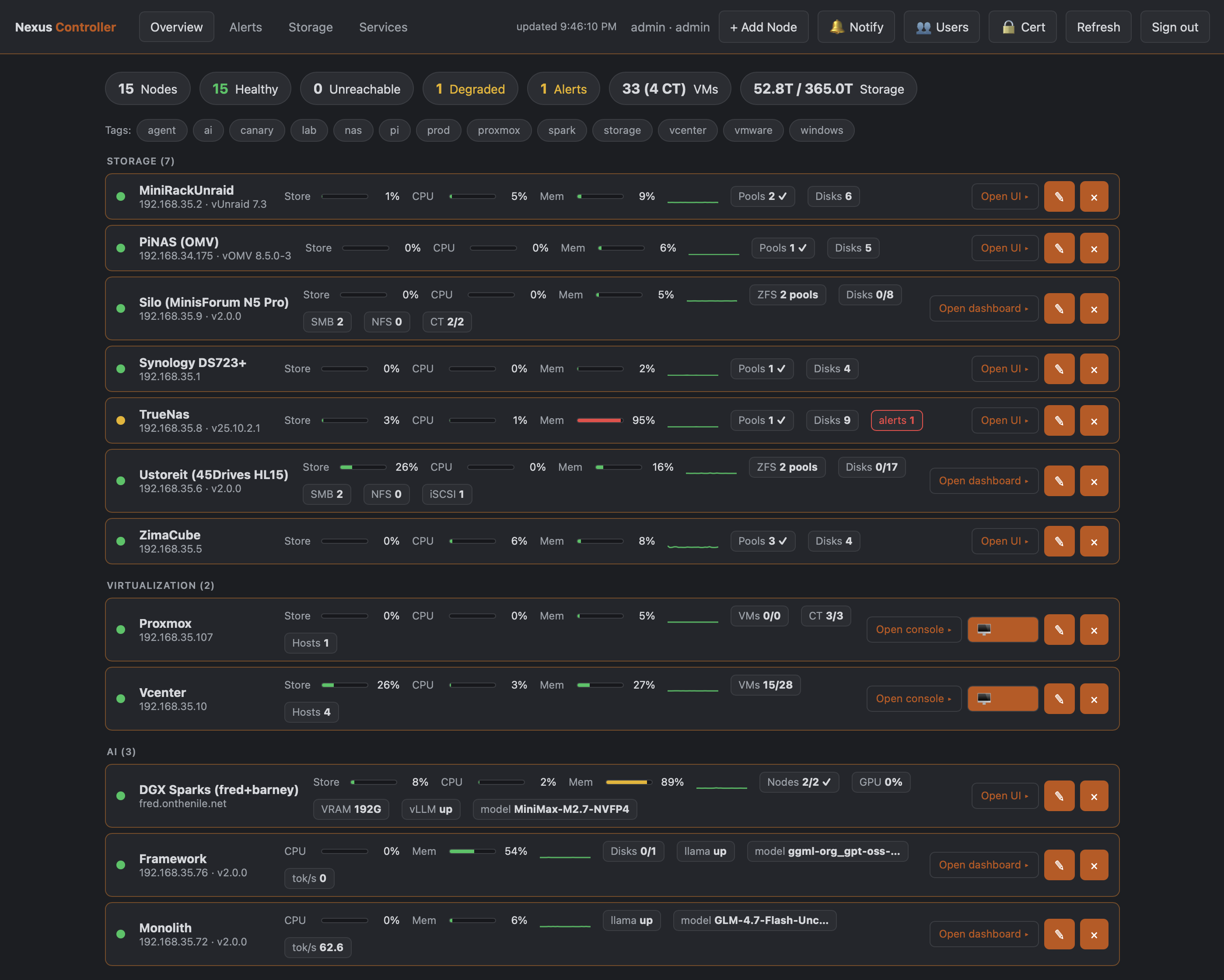
One screen, every machine. The fleet view is the whole lab — dashboards, DNS servers, hypervisors, a NAS, a switch — not just the boxes running my own software.
The first seam: deploying a VM
The deploy flow was the first thing that genuinely hurt, and the first integration I built.
Here is what it looks like now. You pick a template in the deployer and choose IPAM as the address mode. Before a single disk block is cloned, the deployer calls the IPAM’s provision endpoint. The IPAM allocates the next free address in the right network — skipping DHCP pools and the gateway — fills in the gateway, DNS servers and search domain from the network plan, writes the A and PTR records, and pushes them to both DNS servers. Only then does the clone start.
one engine each
next free address
writes A + PTR
A + PTR
name resolves before boot
now being watched
That ordering is the whole point. The name exists before the machine does. Cloud-init finishes on a host that already resolves, which means the first thing that tries to reach it by name succeeds — instead of the ten-minute gap where a box is up but nameless and you are pinging an address you wrote on a sticky note.
One honest caveat on the diagram: the last hop is still me. The controller does not learn about a new node on its own — adding it is one click and a token, but it is a click, and it is the step I still forget.
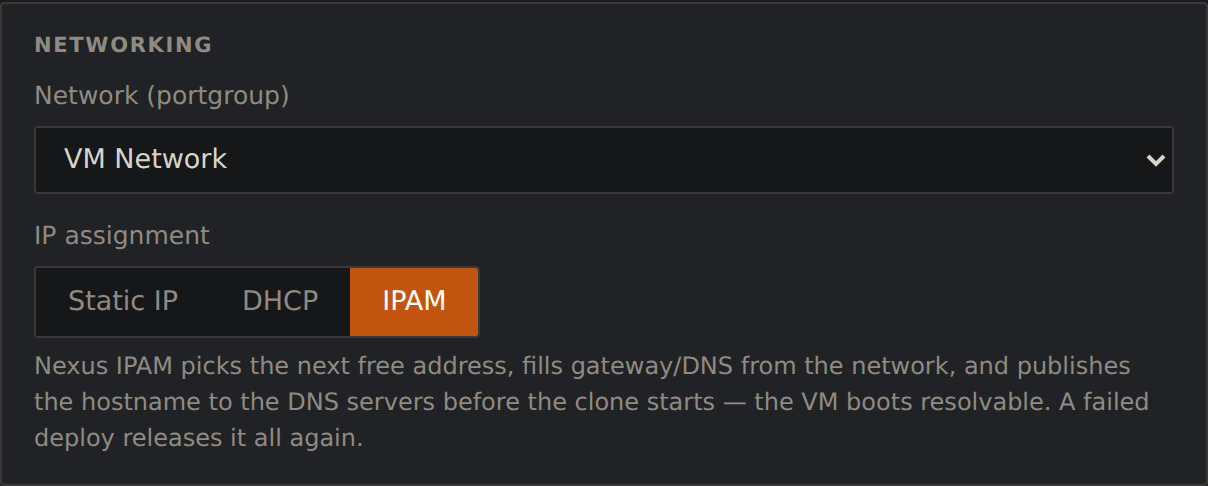
Choosing IPAM instead of typing an address. This one control is the whole first integration.
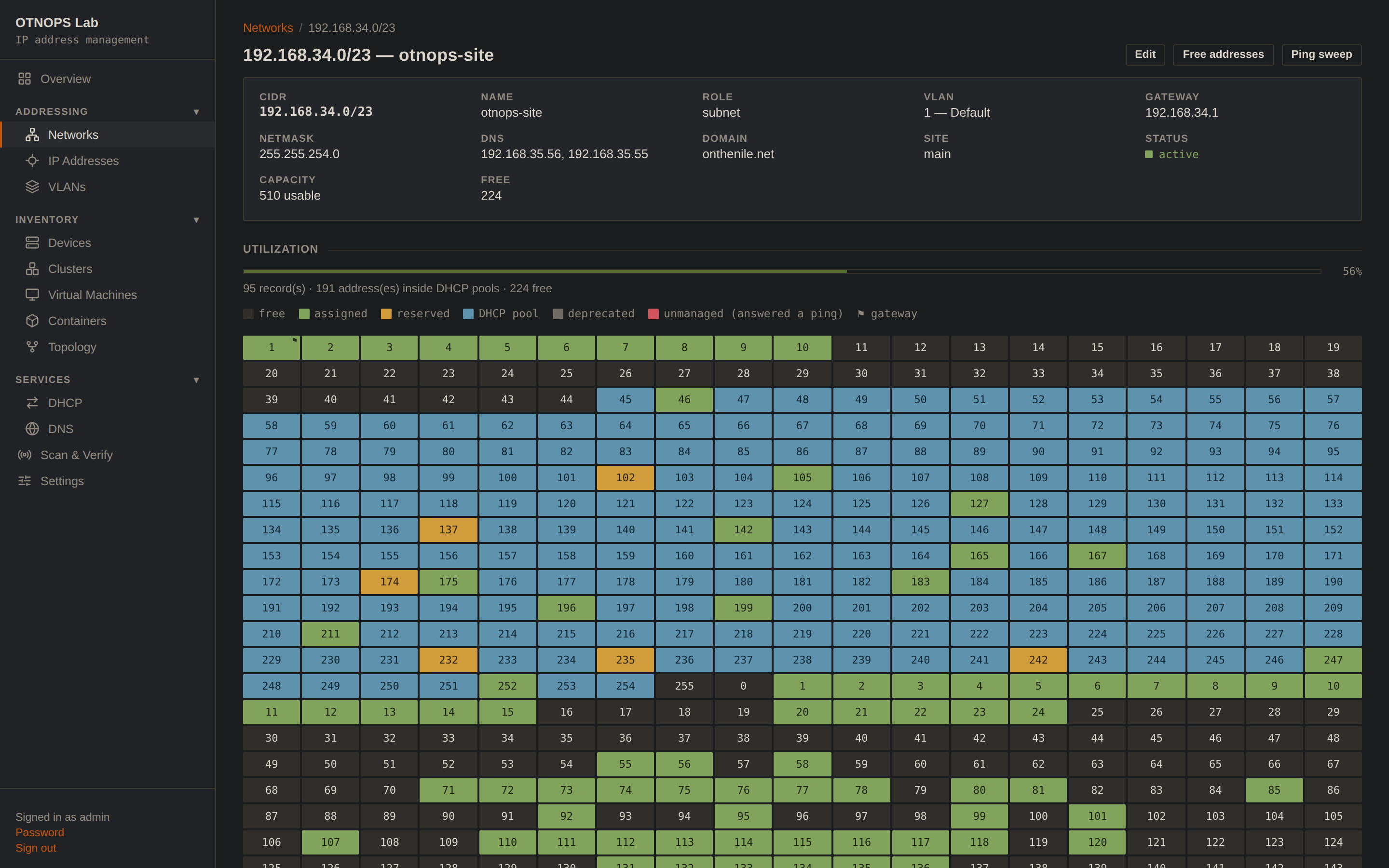
Where that address came from — and what else the network already holds.
The part I want to be honest about: this integration is one-directional and push-based, and that was a deliberate choice that cost me some convenience.
The IPAM pushes rendered configuration to the DNS servers. It does not drive them live, and they do not call back. DNSMAQ-MGR serves from its own local state and has no idea the IPAM exists. If the IPAM is down — container stopped, host rebooted, me breaking something — name resolution and DHCP keep working exactly as before. Nothing degrades. You simply cannot allocate a new address until it comes back.
(The one thing I added later is a read-back: after a push, the IPAM asks each DNS server what it is holding and shows “in sync” or not. That is a check, not a dependency — the servers still never need the IPAM to answer a query.)
I could have built this as a live integration, with the DNS manager querying the IPAM. It would have been less code. It would also have meant that the box which hands out addresses becomes a hard dependency of every DNS lookup on the network, and I was not willing to buy convenience at that price.
Integrate through pushed state, not runtime calls. Every connection in this ecosystem hands over rendered configuration that the receiver owns and serves independently. Nothing in the critical path — DNS, DHCP, authentication at a node — needs another service to be alive at the moment it answers.
The second seam: nobody was watching
The second problem was quieter. Machines existed that nothing was looking at.
A node would be deployed, do its job, and slowly drift — a service failing, a pool filling, a certificate expiring — and I would find out weeks later, by accident. Not because monitoring was hard, but because adding each new machine to the thing that watches it was a manual step I kept forgetting.
The controller closed that. It polls every device it knows about, holds the credentials centrally, and — this is the part that took discipline — holds no privilege of its own. It authenticates to each node with that node’s own token. Compromising the controller gets you the ability to ask machines questions they were already willing to answer, not root on 24 boxes.
What made it an ecosystem piece rather than another dashboard is that it does not only watch its own kind. It polls SparkDash instances, DNS servers, hypervisors, a NAS, a switch. The fleet view is genuinely the whole lab, not the subset that happens to run my dashboard.
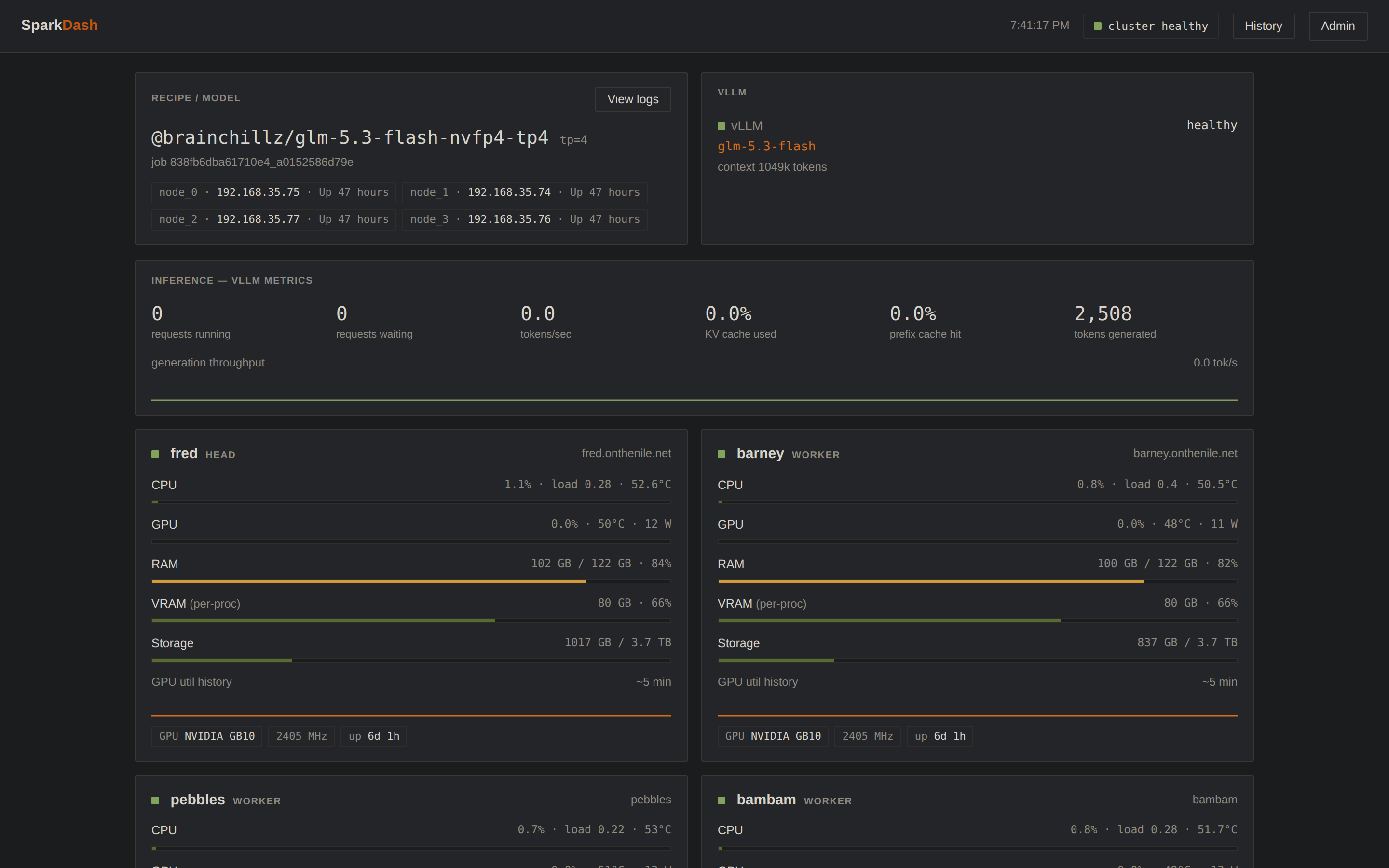
SparkDash on the Spark cluster — four nodes, one vLLM recipe, per-node GPU and memory. Different hardware, same fleet view upstream.
The third seam: one identity
For a long time every application had its own login. Same password, seven places, because I am not immune to the thing I would tell anyone else not to do.
That is the seam NexusSSO closed, and it is the newest piece by a wide margin — most of it was written in August.
The design constraint I set was narrow and I think it is why it worked: the relying parties must not have to change. Not “should not”. Must not. I was not going to touch a dozen dashboard nodes plus a controller plus an IPAM plus three deployers to add authentication, because a change that has to land in seventeen places at once does not land at all.
So the issuer signs a short-lived assertion — Ed25519, 120 seconds, single-use, addressed to exactly one application — and each relying party verifies it with about forty lines of dependency-free code and exchanges it for the session it already knew how to make. Past that exchange, an application genuinely cannot tell an SSO login from a password one. No route behaves differently. No API token changes. Nothing downstream knows.
dashboards · IPAM · deployers · hypervisors
/sso/authorize
one sign-in
120s · single use
app cannot tell how
There are 23 applications registered now. Adding one is a one-time code pasted into that app’s settings; the application registers itself and picks up the issuer’s public key without anyone copying values by hand.
Two rules I would keep if I built it again:
SSO grants access to accounts that already exist. It never creates them. The assertion names a subject; that subject must already have an account on the application. So the worst a compromised issuer can do is sign in as somebody who already had access — it cannot invent an administrator on a node that has none.
The local password never goes away. Every application keeps its own login working. An identity provider that is also a single point of failure for reaching the machines you would use to fix it is not a good trade, and the day the issuer is down is exactly the day you need into everything.
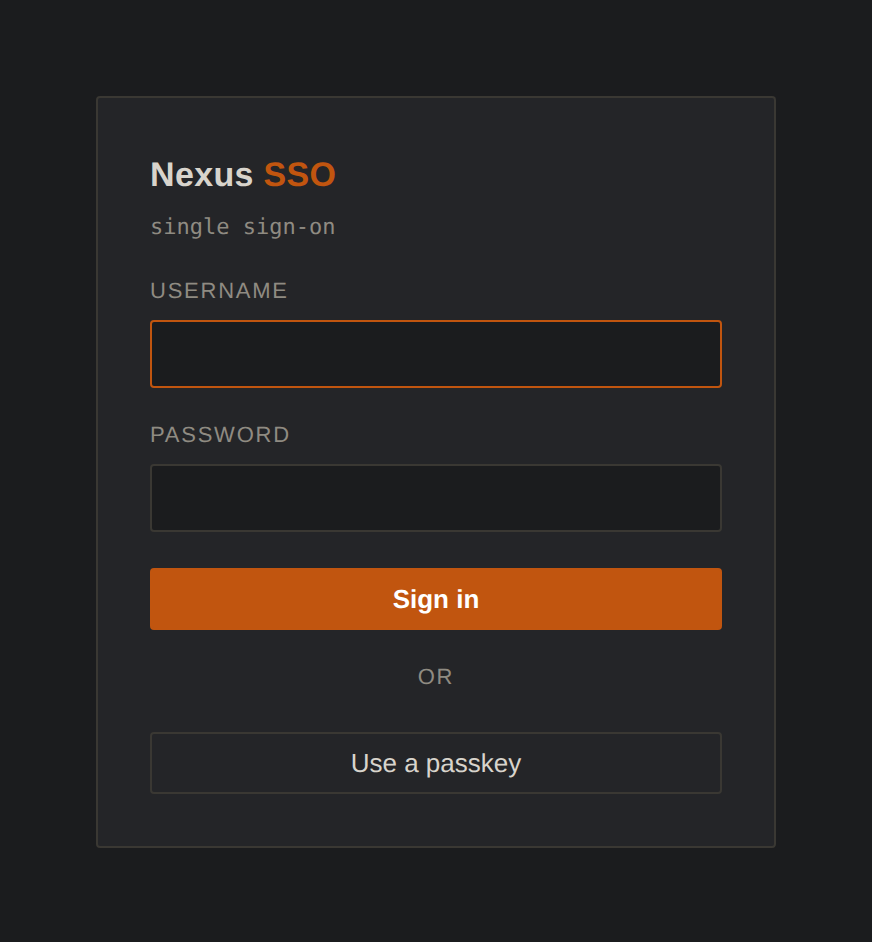
The sign-in screen. Username and password, or a passkey — this is the one page every application now bounces to.
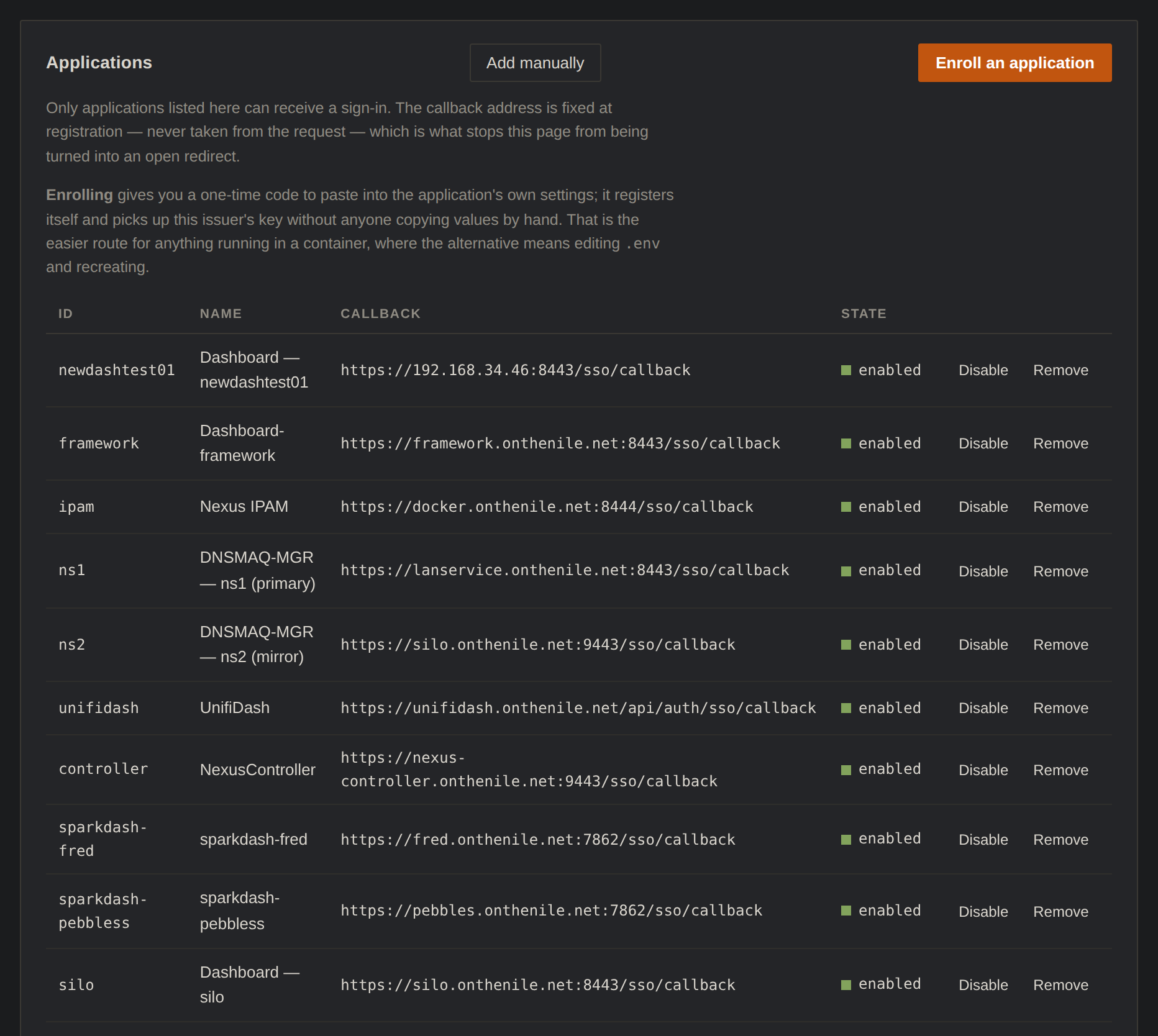
The registry. Every application allowed to receive a sign-in, each with the callback it was registered with — never one taken from the request.
Because every browser sign-in now funnels through one origin, adding passkeys turned out to be almost free. Passkeys are origin-bound, which normally makes them miserable across a fleet — a separate credential per application, re-registered on every device. But there is only one origin that matters here, so support landed entirely inside the issuer. Not one relying party changed. The assertion format did not move.
That is the compounding return of an ecosystem, and it is the clearest example I have: a feature that would have been seventeen implementations became one, because a boundary had been drawn correctly two months earlier.
The fourth seam, added the same day: the hypervisors, and a front door
I published this article this morning, and then spent the afternoon closing the one seam it admitted was still open. So rather than pretend this was always part of the plan, here it is as an addendum.
Two things were still outside the sign-in: vCenter and Proxmox. Neither can speak the little assertion format above, and I was not going to patch a hypervisor. They speak OpenID Connect, and only that. So the issuer learned to speak it too — a discovery document, an authorize endpoint, a token endpoint, RS256 tokens, the standard shape — bolted onto the same session and the same passkey. Nothing about the existing relying parties changed. Same rule as before.
Proxmox was the easy one. It has an OpenID realm type, you point it at the discovery URL, and it appears in the realm dropdown. The one thing it does that the spec does not quite promise is send a bare-origin redirect address, no trailing slash, so the registration has to match that exactly or you get a very blunt error.
vCenter was the interesting one. vSphere 8.0.3 will federate identity, but the wizard only lists a handful of providers by name — and one of them is Okta. Okta, underneath the branding, is plain OpenID Connect plus SCIM, and vCenter does not check who is actually on the other end of the discovery URL. So the issuer introduces itself as an Okta and vCenter believes it. The part I had not planned for is that vCenter will not grant a role to a user it has never heard of; it expects the identity provider to push users and groups into it over SCIM before anyone signs in. So now the issuer pushes. That is the one place the rule from earlier bends — SSO here does create the account on the far side — but it creates it with no role, and the role is still granted by hand in vCenter. A compromised issuer still cannot make itself an administrator.
The result is the thing I actually wanted when I started: touch the fingerprint reader once, and vCenter opens. Same for Proxmox. Both keep their local login — vCenter tucks it behind a small link under the SSO button, which took me a minute to find.

vCenter’s front door now. The big button goes to NexusSSO; the small link underneath is the local account, which I am keeping, per the rule.
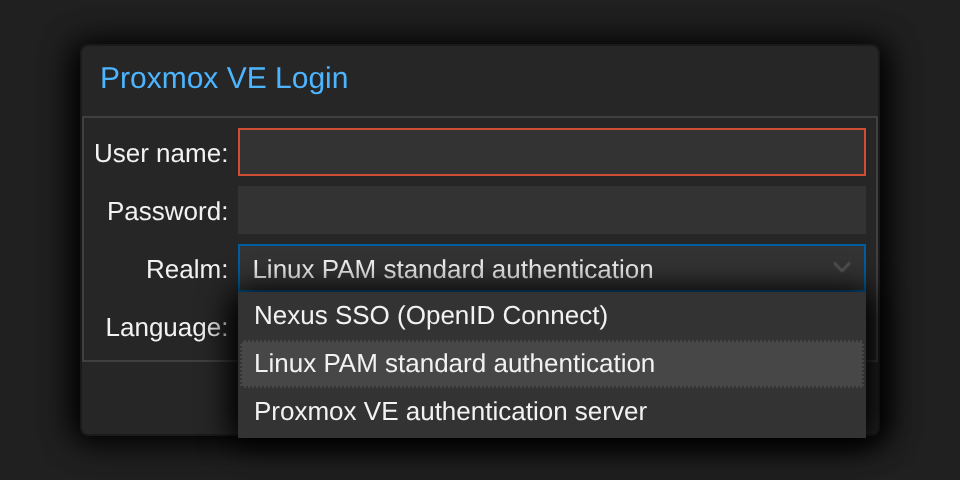
Proxmox just lists the issuer as another realm, next to the two built-in ones.
And because every application now sits behind one origin anyway, the issuer grew a front door. The page you land on after signing in is a launcher: every registered application as a tile, grouped by what it is for, each one a sign-in link, so the far side opens already logged in. The tile list is the registry — enrol an application and it appears, nothing configured twice — and the health on each tile is read from the controller’s wallboard, the IPAM’s counts and the DNS servers’ own health endpoints. The same read-only tokens the article already described. Fleet nodes get their own tab so the machines do not crowd out the tools.
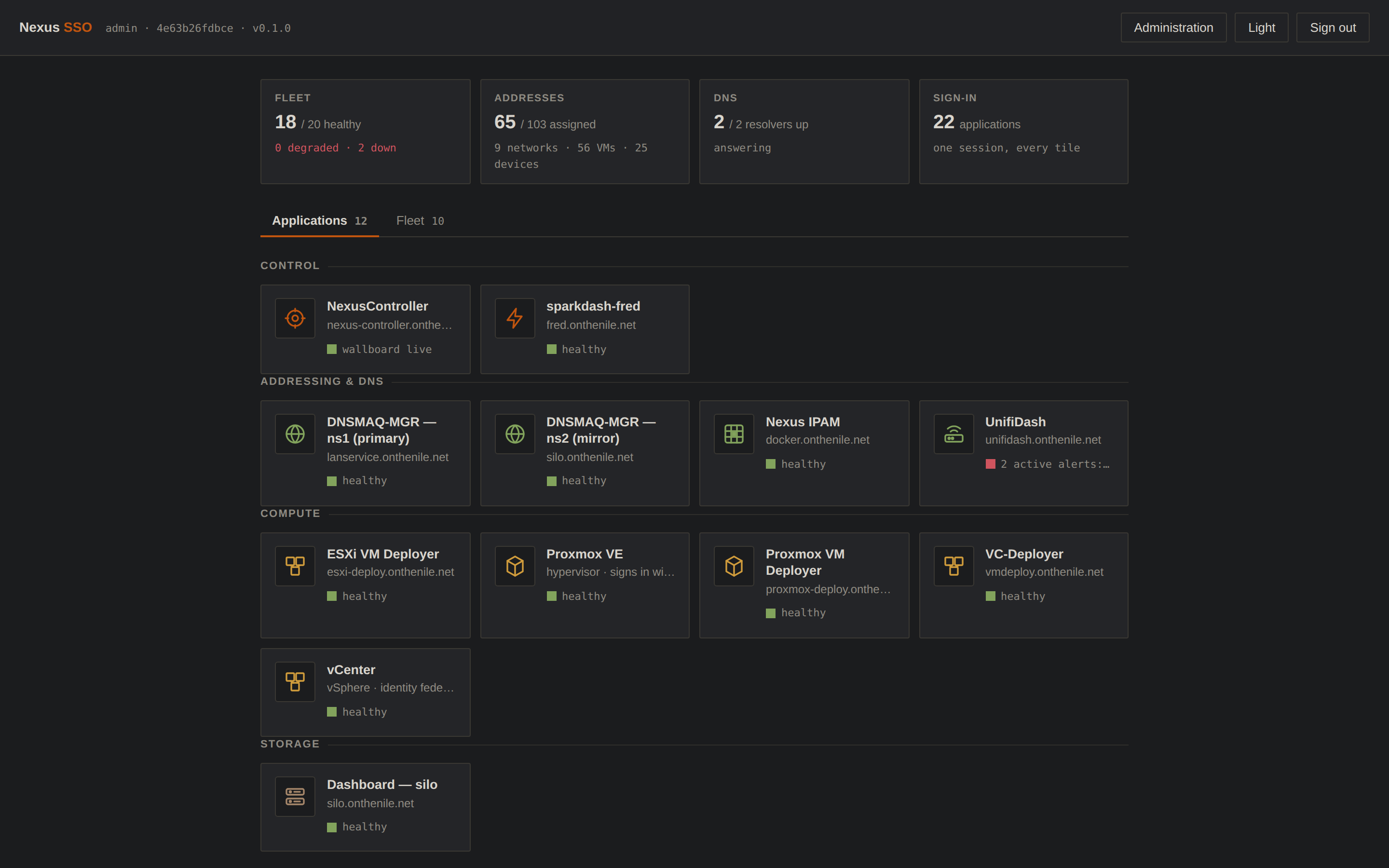
The launcher, live. Twenty-two tiles across four groups; the red one is UnifiDash reporting two alerts, which is the point of putting health on the tile. Proxmox and vCenter are the two new ones under Compute.
It took an afternoon. It took an afternoon because the boundary was already there.
What the whole is doing that the parts weren’t
| Question | Before | Now |
|---|---|---|
| What address should this new VM get? | look it up, write it down | the deployer asks IPAM |
| Does the name resolve yet? | create the record afterwards | written before the clone starts |
| Is anything watching this box? | only if you remembered | one click on the controller — still a step |
| Which machines are unhealthy? | check each one | one fleet view, 24 devices |
| How many logins to touch all of it? | seven | one — or a fingerprint |
| Getting into the hypervisors | their own accounts, their own passwords | the same passkey, via OpenID Connect |
| Where does addressing live? | a spreadsheet | one system of record |
| Adding a new capability everywhere | edit N applications | once, if the boundary was right |
The row I care about most is the last one, and it is amber rather than green — because it is conditional. (The other amber row is amber for a duller reason: I have not automated it yet.) Passkeys landed in one place because sign-in had already been centralised. So did the launcher, and so did the hypervisor federation an afternoon later. Had I tried the same trick with something the boundary did not cover, it would have been seventeen edits again.
Ecosystems do not make everything cheaper. They make the things that respect the boundaries dramatically cheaper, and everything else exactly as expensive as before.
What it cost
I would rather this article not read as a victory lap, so here is the bill.
You inherit failure modes you did not have. A pile of independent tools fails independently — that is its one real virtue. The day I migrated a set of callback URLs, I broke the certificate fingerprints the controller had pinned for three nodes, and it logged the mismatch a hundred and sixty times before I noticed. That failure did not exist when nothing was connected to anything.
Ordering becomes load-bearing. “Write DNS before cloning” is not an implementation detail, it is the feature. Get the order wrong and you have built the same manual process with extra steps.
The integration points need to be boring on purpose. Every connection here is a one-time code, a pushed config file, or a signed assertion. No shared database, no message bus, no service mesh. When something breaks I want to be able to curl the seam and read the answer, and every time I have been tempted by something cleverer I have regretted it within a month.
Documentation becomes infrastructure. With one tool, the code is the documentation. With seven that reference each other, the thing that actually rots is the note explaining which name a service answers to, and which of three similarly-named directories holds its source. I have broken more evenings on stale notes than on stale code.
What this isn’t
There is no HA. No clustered control plane, no failover, nobody to call. The issuer is a single container, and if the box it runs on dies I am signing in with local passwords until I bring it back — which is precisely why every application still has one.
It is also not a product, and it is not trying to be a platform. There is no abstraction layer here that would let you swap the IPAM for a different IPAM. The pieces know about each other in small, specific, hard-coded ways, and that is a deliberate trade: seven applications that integrate concretely were achievable in evenings, and a generic platform was not.
And it is emphatically not Kubernetes. Every piece of this runs as a systemd unit or a plain container, holds its state in JSON files or SQLite, and can be understood by reading one file. That is not a limitation I am apologising for. It is the reason I can still fix any of it at 11pm.
Closing thought
The thing I did not expect is that none of the integrations were technically interesting.
An HTTP call to get an address. A config file pushed to a DNS server. A signed token exchanged for a cookie. Every one of them is the obvious solution, written in an afternoon, using no library anyone would be impressed by. There is not a single clever idea in the connective tissue, and I now think that is exactly why it works — the interesting parts are all inside the individual applications, where they can fail alone.
What changed was not capability. Every one of these tools could already do its job before any of them could talk. What changed is that I stopped being the integration layer. The lab used to require me to hold its state in my head and move it between interfaces by hand; now it holds its own state, and I go and ask it.
That is the whole difference between a pile of tools and a system. Not features. Not scale. Just the point at which the software knows something you would otherwise have had to remember.