The problem every network has, at every size
Every network answers three questions constantly: what is this machine called (DNS), what address does it get (DHCP), and who is supposed to be using which address (IPAM). The enterprise world bundles those into a product category, DDI, and sells appliances for it: Infoblox, BlueCat, EfficientIP. They are excellent, and they are priced and sized for organizations with network teams.
Below that line, the same three questions usually get answered with a hosts file on one box, the DHCP tab of a consumer router, and a spreadsheet that was accurate in March. The failure mode is always the same: the three sources drift apart, and one day two machines claim the same address, or a hostname points at a machine that was decommissioned last year. The information existed; it just lived in three places with no referee.
The stack described here takes the enterprise idea of one system of record driving DNS and DHCP and rebuilds it at homelab scale from two small, self-hosted web apps that also work perfectly well alone.
The serving layer: DNSMAQ-MGR
DNSMAQ-MGR is a management plane for dnsmasq, the same lightweight resolver/DHCP server that already runs inside most routers. The app owns the configuration: everything lives in its JSON stores and renders into a dedicated conf-dir. The distro’s own dnsmasq.conf is never touched. Every change is validated with dnsmasq --test against a temporary render before the live file is swapped atomically, and applied minimally: host records, static leases and options reload with a SIGHUP (zero downtime), only structural changes restart the daemon (~100 ms). A bad edit is rejected with dnsmasq’s own error message before it can touch the running service.
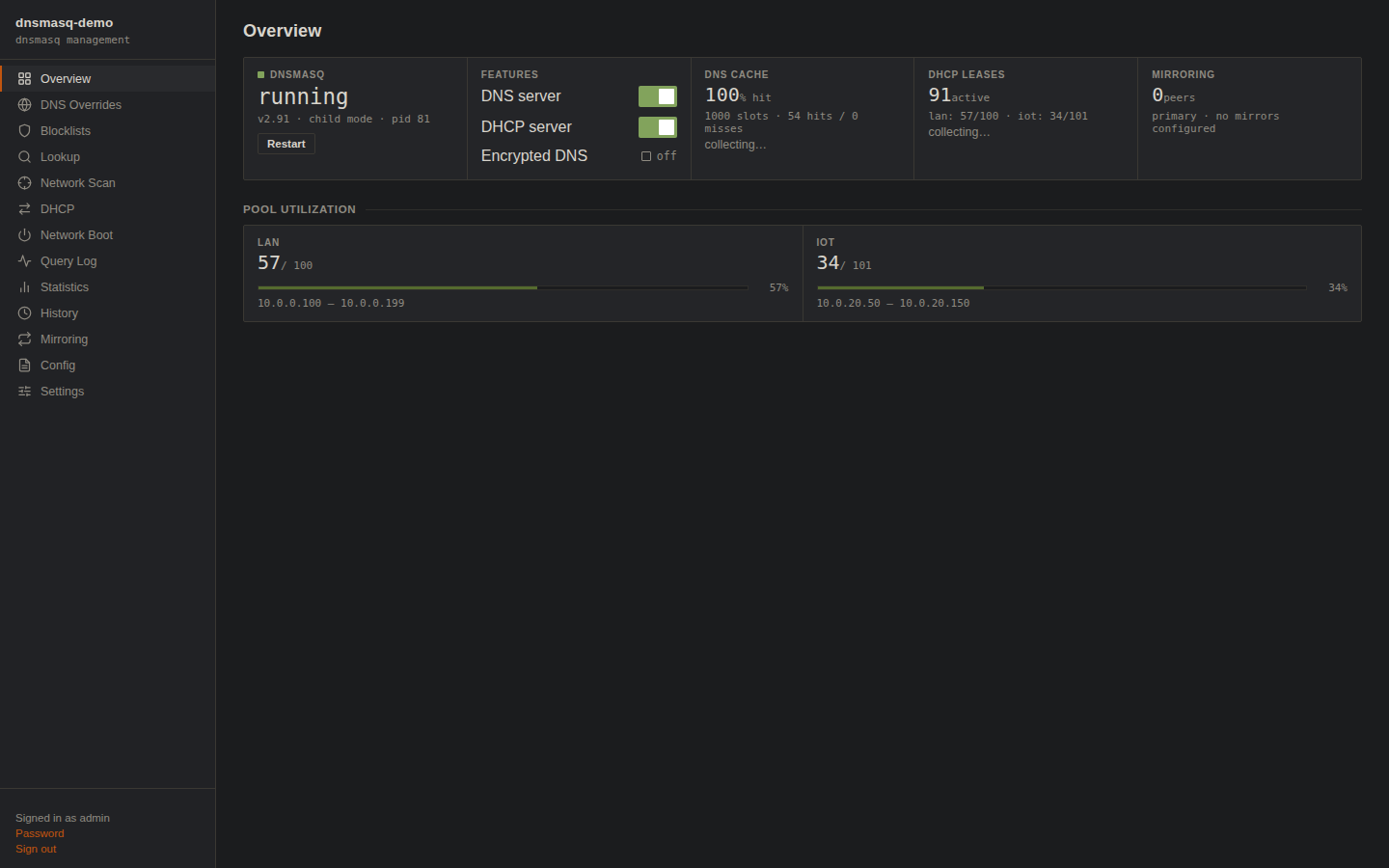
dnsmasq under management: supervised service state, cache hit ratio, live lease counts and pool utilization on one screen.
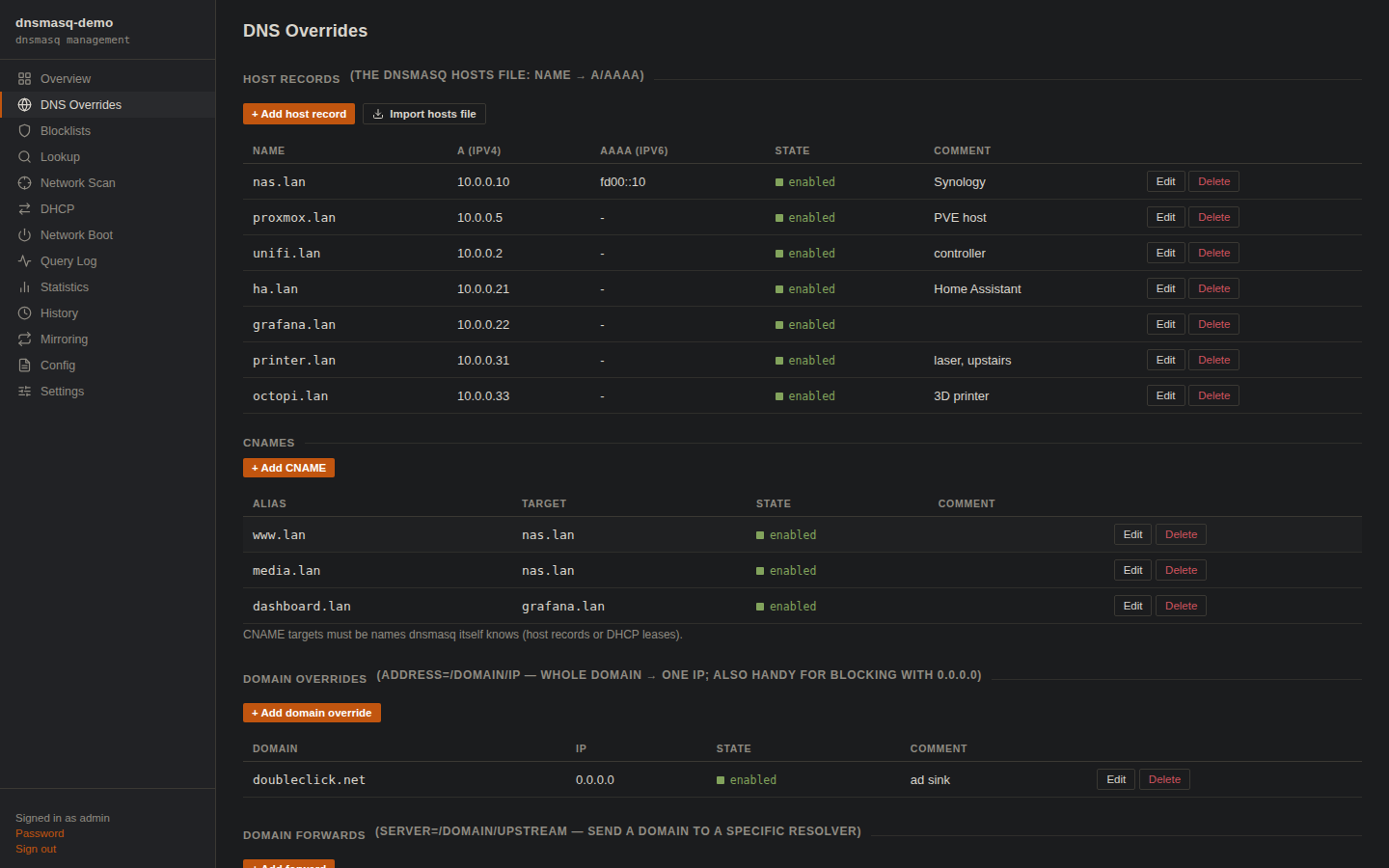
The hosts file, grown up: A/AAAA records, CNAMEs, domain overrides and forwards, all validated before apply.
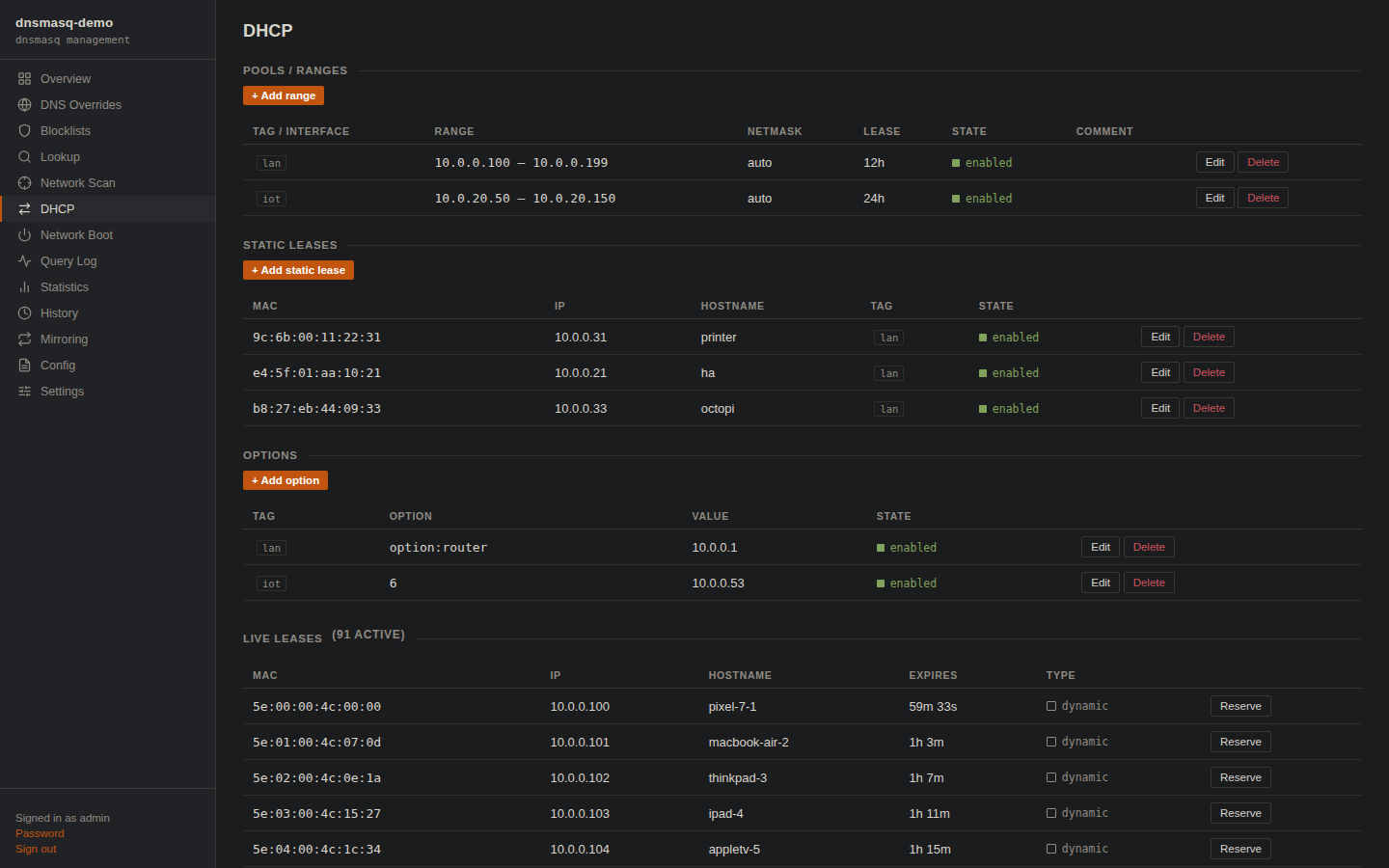
DHCP with pools, reservations, options, and a probe that warns before you start a second DHCP server on a network that already has one.
On top of the basics it carries the features that usually justify a bigger product: blocklist subscriptions for ad/malware sinking, an opt-in encrypted DNS upstream (a supervised dnscrypt-proxy speaking DoH/DNSCrypt, fail-closed by default so a dead proxy stops resolution rather than silently leaking plaintext queries to the ISP), PXE/UEFI network-boot options, a query log, statistics and history. Crucially for this story, it also carries config mirroring: a primary node pushes selected config sections to standby nodes, so ns1 and ns2 answer identically without hand-syncing anything.
The system of record: Nexus IPAM
Nexus IPAM is the address plan. Networks nest under supernets, carry VLANs, gateways, DNS servers and domains; every address record can hold multiple names (deliberate parallel A records are a first-class shape, not an anomaly), a MAC, and a link to the thing that uses it: a device, a VM, or a container, organized into clusters with rack positions.
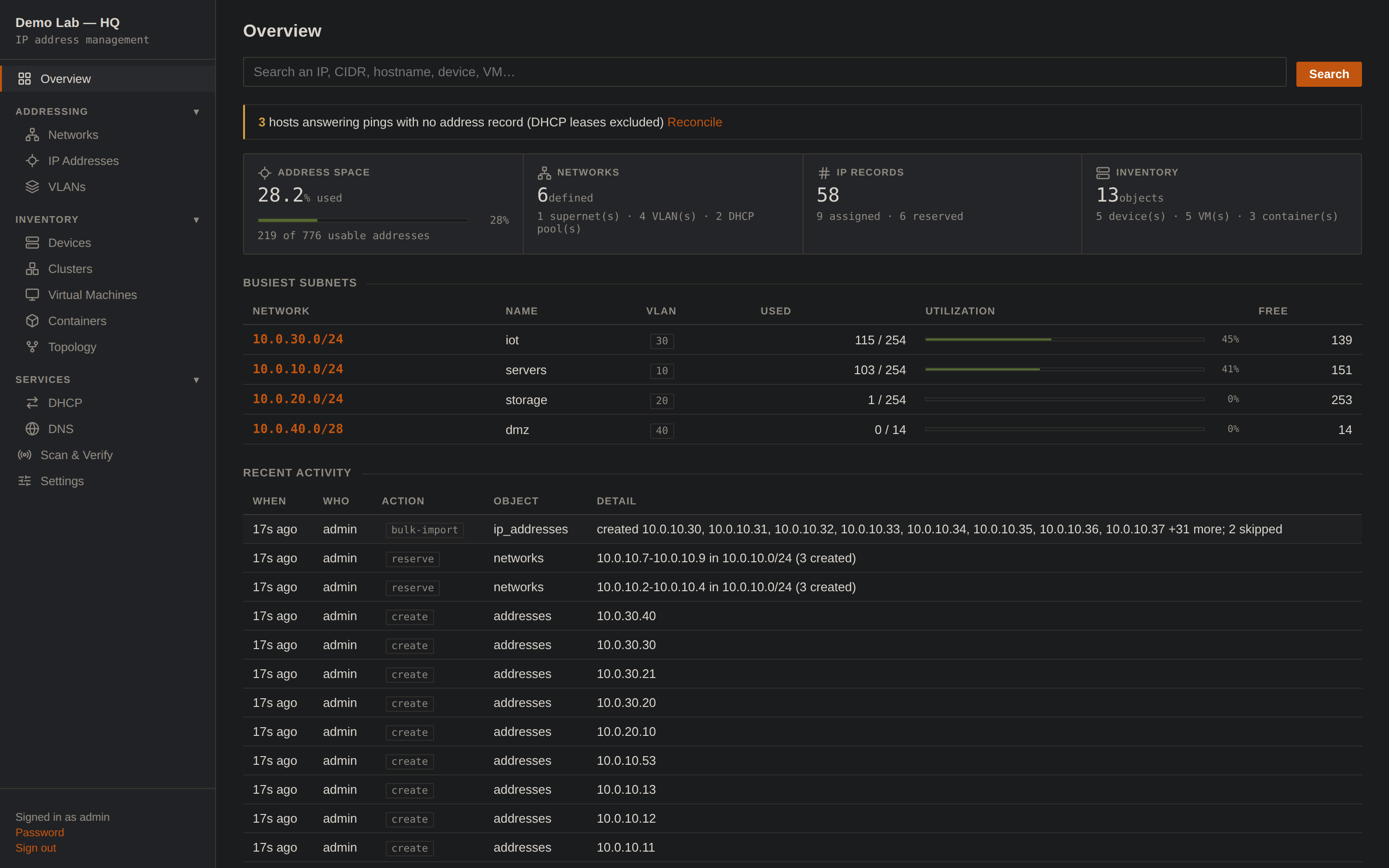
The plan at a glance, and the reconcile banner up top the moment reality disagrees with it.
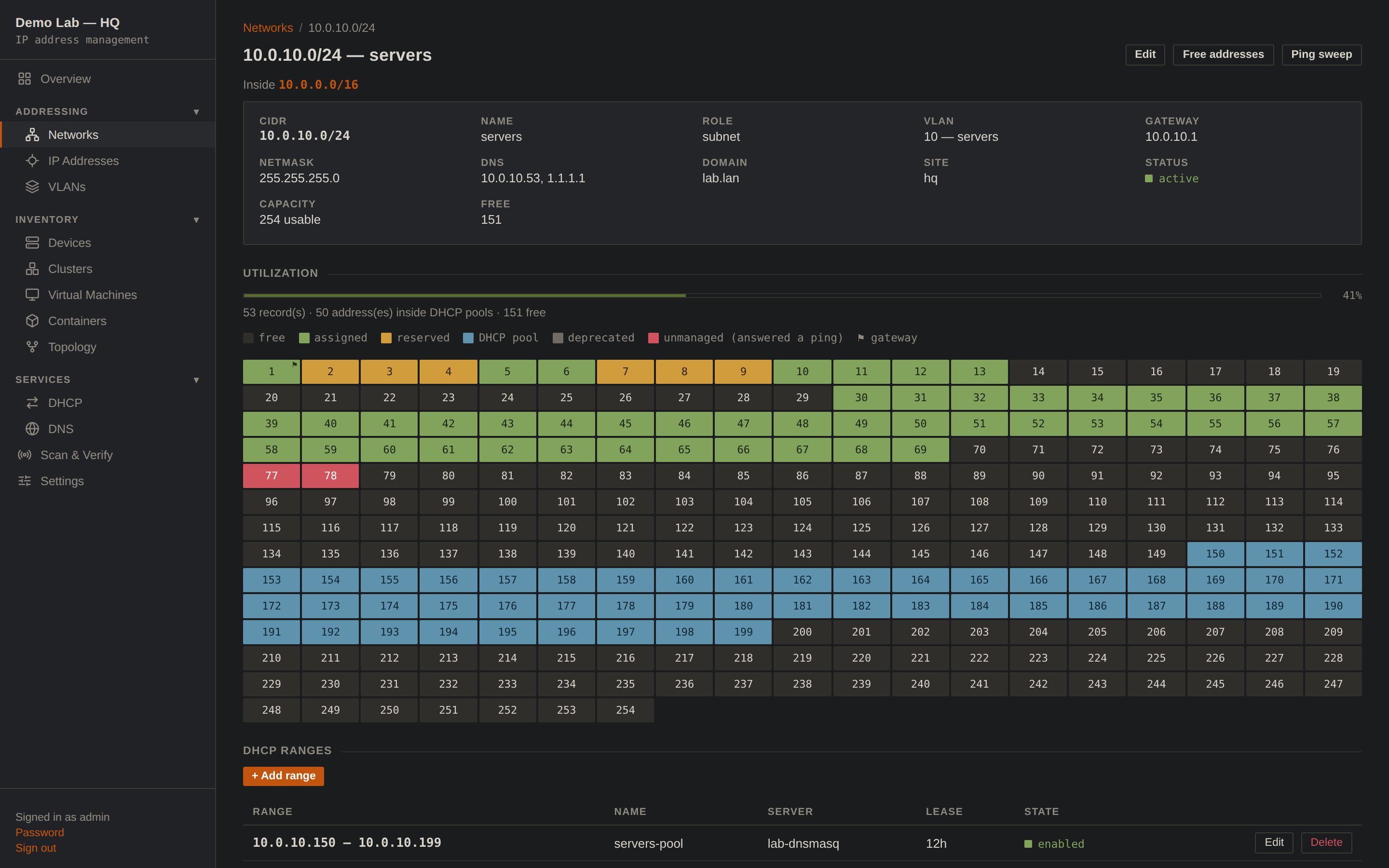
One cell per address: assigned, reserved, DHCP pool, deprecated, unmanaged. The flag marks the gateway; DHCP-pool addresses count as consumed even when no lease exists yet.
What separates an IPAM from a spreadsheet is that a spreadsheet can’t check itself. Here the Scan & Verify page treats the plan as a set of claims and a silent ping as evidence, using the system ping binary so it needs no special privileges. A sweep sorts the world into: hosts answering with no record (someone assigned an address without recording it, the exact conflict an address plan exists to prevent), DHCP leases (expected, reported separately, never mistaken for anomalies), and records that never answer (machines that quietly stopped existing). One click adopts a rogue into the plan with its discovered hostname and MAC.
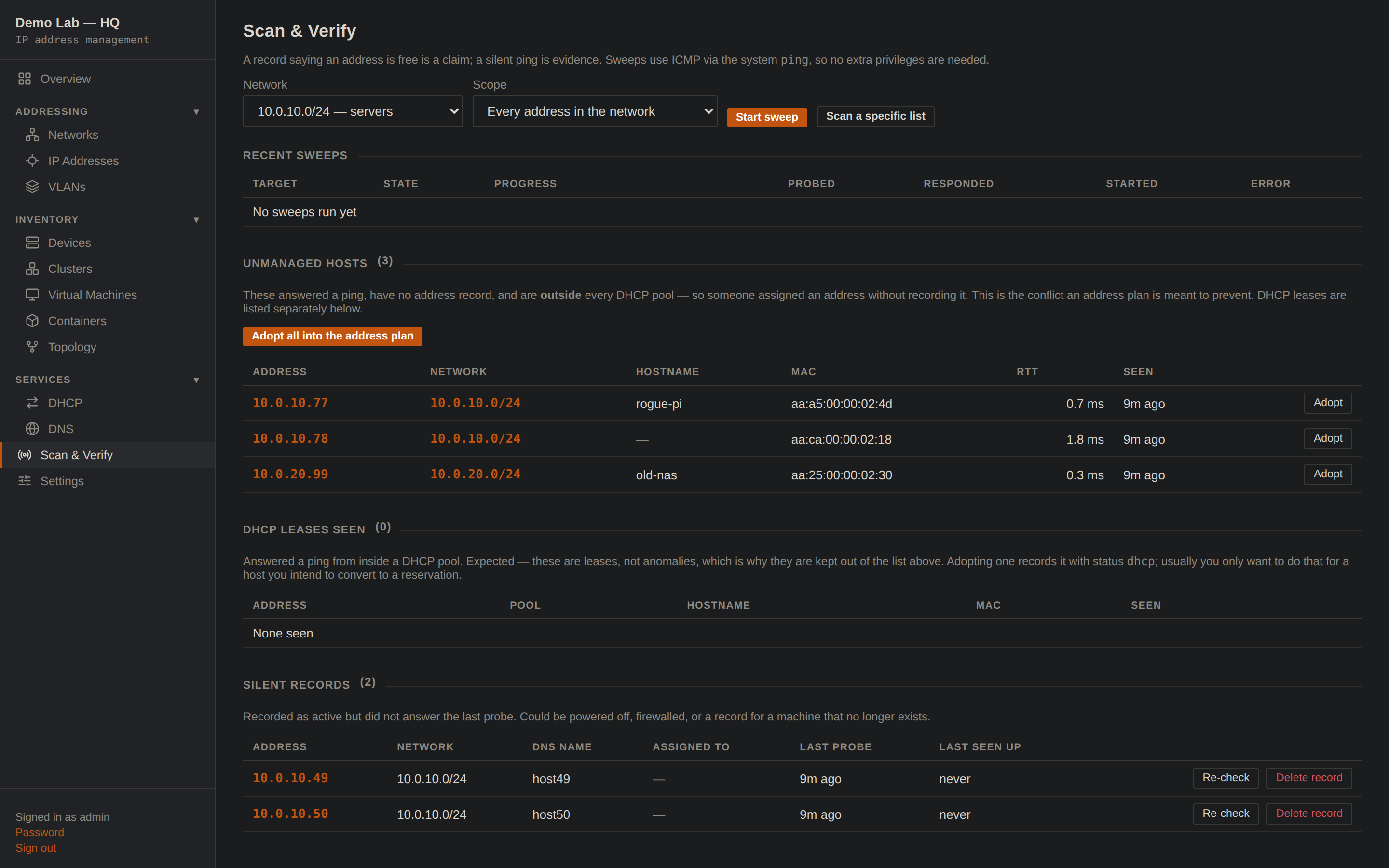
Claim vs. evidence: three unmanaged responders to adopt, two silent records to question.
Wired together: one writer, everything else renders
Each tool is genuinely standalone. Wired together they follow one rule, borrowed straight from how the big DDI suites keep their sanity:
Single writer per data class. Exactly one system authors each kind of fact; everything else renders, serves, or observes it. IPAM owns address assignments and names. Each DNS node owns its own server behaviour: upstreams, blocklists, encrypted DNS. Leases are observed, never authored.
Concretely: IPAM pushes the hosts section to both DNS nodes through DNSMAQ-MGR’s existing mirror-receive endpoint, the same machinery the nodes already use to mirror each other. The pushed section locks read-only in the node UIs (edit names in IPAM, where the record of truth lives), and a Detach button on either node instantly restores local control. The integration required zero changes to DNSMAQ-MGR; to the DNS node, the IPAM is just another mirror source.
addresses · names · pools
A + PTR
hosts section locked
identical answers
(router local DNS)
Names published this way land as A and PTR on every node, and the reverse flow works too: a one-shot importer reads an existing dnsmasq estate into the plan losslessly, aliases and all, because the project rule is round-trip fidelity before authority: IPAM may not become the writer for a data class until import → push-back reproduces the current state exactly.
How it stacks up against the big suites
| Capability | Enterprise DDI (Infoblox-class) | This stack |
|---|---|---|
| Address plan: supernets, VLANs, utilization | yes | yes |
| Authoritative LAN DNS, A/AAAA/CNAME/PTR | yes | yes |
| DHCP scopes, reservations, options, PXE | yes | yes |
| IPAM → DNS enforcement (single writer) | yes | yes (mirror push, A + PTR) |
| Redundant DNS via replication | grid | primary → standby mirroring |
| Network discovery & reconciliation | yes | ping sweeps, adopt / silent records |
| Device / VM / container inventory | yes | with vCenter & controller importers |
| API-first automation, tokens, roles, audit | yes | yes (every UI action is an API call) |
| Encrypted upstream DNS (DoH/DNSCrypt) | varies | fail-closed by default |
| Multi-site anycast, DNS firewall feeds, support contracts | yes | no, and not the point |
| Footprint | appliances / VMs + licensing | two containers, SQLite + JSON |
This is not an Infoblox clone. There is no anycast grid, no threat-feed DNS firewall, no vendor on the phone at 3am. What it replicates is the operating model (one source of truth enforcing DNS and DHCP, with discovery keeping it honest), which is the part a small network actually drifts without.
The payoff: provisioning that talks to the plan
A DDI stack proves itself when other tools stop asking humans for addresses. The add-on here is VC-Deployer, a small web UI (and CLI) that clones vCenter templates into new VMs with cloud-init. Alongside Static IP and DHCP, it grows a third IP-assignment mode: IPAM.
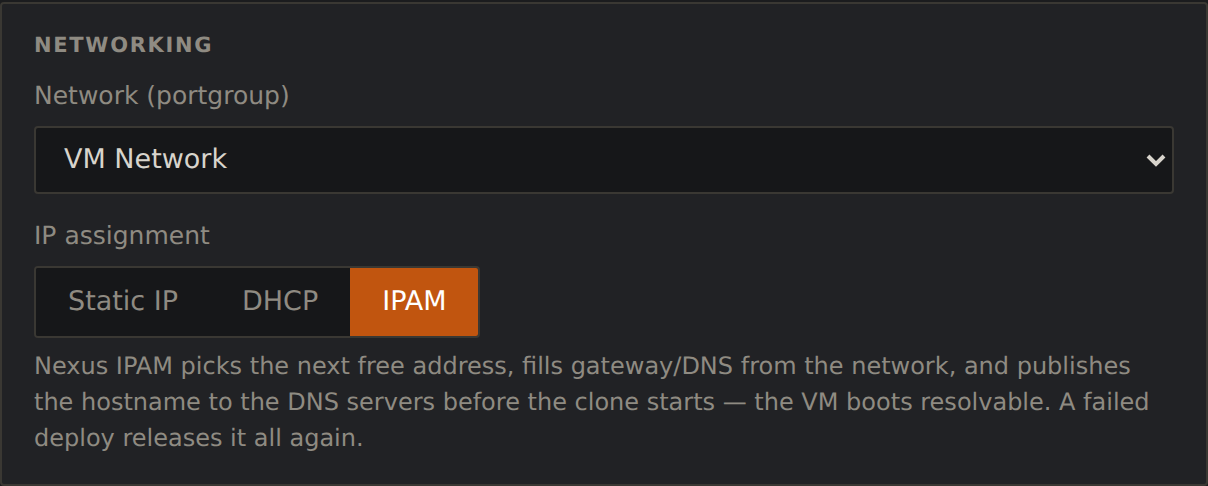
The deploy form’s networking card with IPAM mode selected. There are no address fields to fill, because the plan fills them.
Behind that button is one IPAM call, POST /api/provision, which does, atomically and in order:
- Allocate the next free address in the target network, skipping DHCP pools, the gateway, and anything a sweep has seen answering.
- Record it with the VM’s hostname (and any aliases), linked to the VM object in the inventory.
- Publish the name to every DNS node (A and PTR on ns1 and ns2 via the mirror push) before the clone starts.
- Deploy: clone the template, inject the address, gateway, DNS servers and domain (all read from the network’s plan entry) through cloud-init, power on.
- On failure, release: names removed, address freed, nodes re-pushed. This is the half of the workflow everyone forgets, and the reason stale records exist.
The VM boots already resolvable, with a forward and reverse record that agree, an inventory entry that says where it runs, and an address that can never collide with a lease, because the allocator and the DHCP plan are the same database. Deprovisioning is the exact inverse. No spreadsheet was consulted at any point.
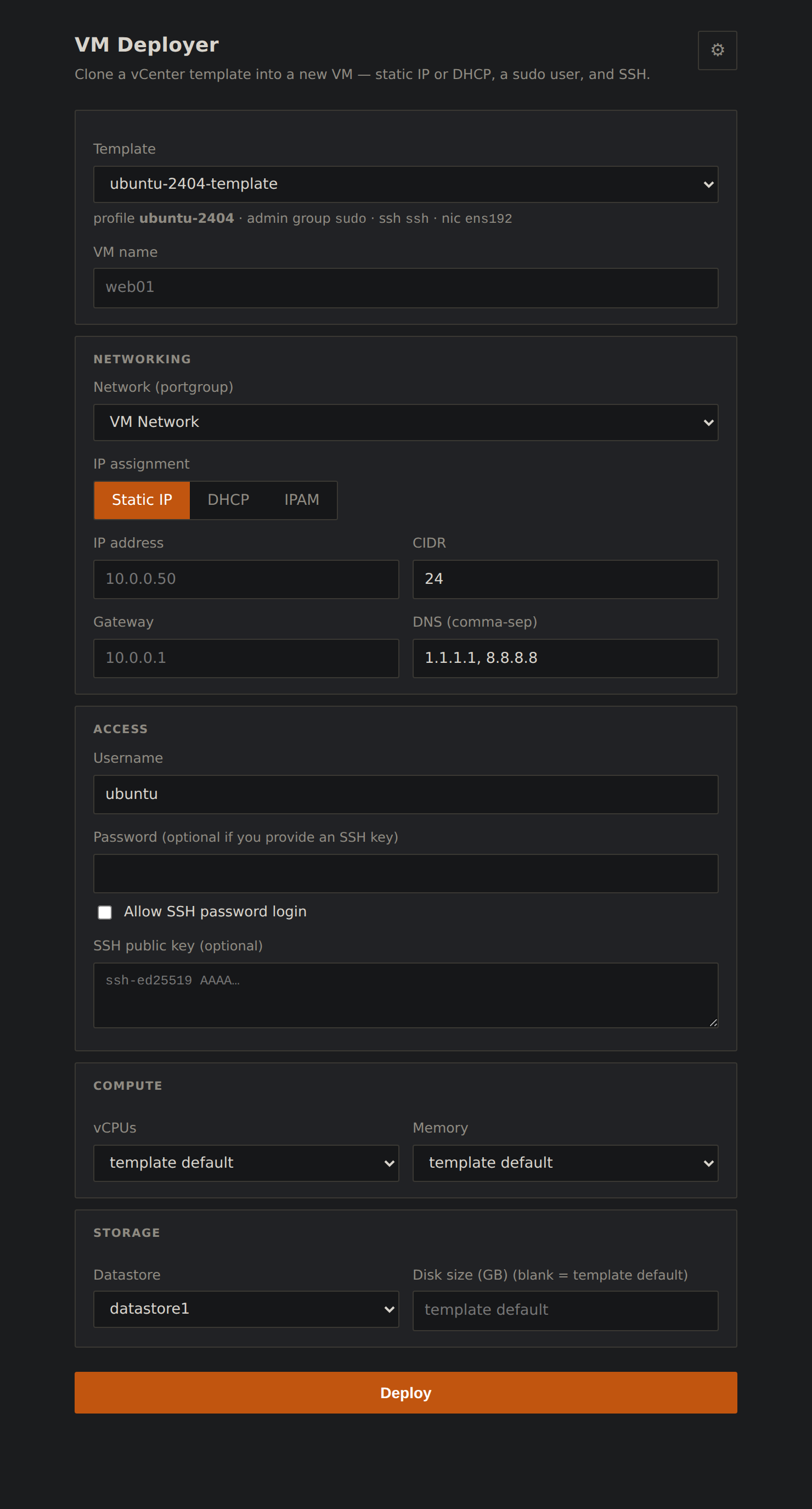
The whole deployer: template, networking with the IPAM mode, access, compute and storage, then one button.
Closing thought
Instead of a rack appliance or a license file, what this required was deciding which system owns which facts, refusing to let any tool write outside its lane, and making the plan verify itself against the wire. That operating discipline, not the hardware, is what the enterprise products actually sell. At small scale you can have it for the cost of two containers and an afternoon.